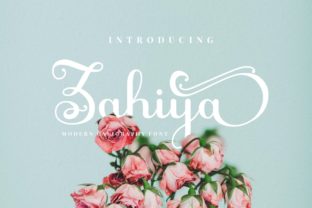
Zahiya: A Charming Script Font for Web Design
I was recently tasked with refreshing the landing page for a boutique floral studio, and the existing typography felt too rigid for their brand. The client wanted something that whispered elegance rather than shouting corporate authority. That is when I pulled Zahiya from my library of creative fonts. As a sweet and charming script within the Script Amp collection, it promised to bring a human touch to the digital interface. After testing it across various breakpoints and layout configurations, I can confidently say that Zahiya is more than just a decorative element; it is a strategic tool for enhancing brand identity in web design.
Bringing Warmth to Digital Hero Sections
The first place I tested Zahiya was in the hero section of the homepage. In modern typography, the hero header sets the emotional tone for the entire user journey. I paired Zahiya with a clean, geometric sans serif font for the subheadline and call-to-action buttons. The contrast was immediate and effective. The flowing curves of Zahiya softened the starkness of the white space, creating a welcoming atmosphere that invited users to scroll further.
What makes Zahiya stand out as a premium font for display use is its balanced stroke weight. Many script fonts struggle on screens because thin lines disappear or thick clusters become muddy. Zahiya maintains excellent legibility even at larger sizes, making it ideal for headline text, welcome messages, or featured quotes. It does not try to mimic perfect handwriting, which often looks artificial on screens. Instead, it offers a stylized, consistent charm that feels authentic yet polished. This reliability is crucial when you are designing for a commercial font license where brand consistency is paramount.
Readability and Responsive Layout Considerations
As a web designer, my primary concern is always how a typeface performs on mobile devices. A font that looks stunning on a 27-inch monitor can become illegible on a smartphone screen if not handled correctly. During my review, I tested Zahiya on various viewports, from wide desktop screens to narrow mobile displays. The results were promising, but they required thoughtful implementation.
Zahiya shines as a display font, meaning it is best reserved for short phrases, titles, and accent text. I found that using it for navigation menus or body copy was not suitable. The intricate connections between letters, while beautiful, can reduce scanning speed when used in dense paragraphs or small sizes. For body text, I stuck to a simple sans serif font to ensure accessibility and ease of reading. However, for section headings, pull quotes, and testimonial headers, Zahiya added a layer of sophistication without compromising clarity.
When using Zahiya over image backgrounds, such as in a banner or promotional graphic, I recommend adding a subtle overlay or text shadow. This ensures that the delicate swashes and ligatures remain distinct against complex visuals. This attention to detail enhances the perceived quality of the website and supports a cohesive visual hierarchy. It is these small UX-aware decisions that transform a good design into a great user experience.
Elevating Brand Identity Through Font Pairing
One of the most exciting aspects of working with Zahiya is exploring font pairing options. A script font rarely stands alone; it needs a supporting cast to create a balanced composition. In my project, I paired Zahiya with a neutral sans serif font for the main content. This combination created a modern, editorial design feel that appealed to the target audience of young couples planning weddings.
For a different client, a life coach wanting a more traditional vibe, I paired Zahiya with a classic serif font. The result was warm, trustworthy, and inviting. This versatility makes Zahiya a valuable asset in any designer’s toolkit. Whether you are building a portfolio site, an online store, or a course sales page, Zahiya adapts well to different brand personalities. It works beautifully for logo design elements, social media graphics embedded in the site, and digital ad banners.
It is important to note that Zahiya is part of the Script Amp category, which suggests a focus on high-quality, curated scripts. When selecting fonts for client projects, knowing the source and quality of the typeface matters. Zahiya delivers on the promise of being a perfect crafting font, but its application extends far beyond printable materials. It brings the same tactile warmth of handmade goods to the digital realm, helping online brands feel more personal and approachable.
Practical Implementation for Web Projects
Before integrating Zahiya into a live website, there are technical considerations to address. First, check the included file formats. For web use, you will need WOFF or WOFF2 files to ensure fast loading times and broad browser compatibility. Heavy font files can slow down page speed, which negatively impacts SEO and user retention. Zahiya appears to be optimized well, but always test load times after implementation.
Also, review the commercial font licensing terms. If you are using Zahiya for a client’s e-commerce site or a SaaS platform, ensure your license covers web embedding and digital product creation. Some licenses require separate purchases for webfont usage versus desktop design. Additionally, check for multilingual support if your audience is global. While Zahiya is charming, it may not support all character sets, so verify this before finalizing the design assets.
In terms of specific use cases, I found Zahiya particularly effective for:
- Hero Headlines: Creating an immediate emotional connection.
- Testimonial Headers: Adding a personal, handwritten feel to customer reviews.
- Call-to-Action Accents: Highlighting key words in buttons or banners without overwhelming the user.
- Blog Post Titles: Making editorial content feel more engaging and less sterile.
- Digital Product Mockups: Enhancing the presentation of ebooks, courses, or templates.
Avoid using Zahiya for form labels, error messages, or footer links. These elements require maximum clarity and quick recognition, which a decorative script cannot provide. Stick to clean, simple fonts for functional UI elements to maintain accessibility standards.
Final Verdict on Digital Usability
Zahiya is a delightful addition to the world of web design fonts. It bridges the gap between the organic warmth of handwriting and the precision required for digital interfaces. It is not a utility font for heavy reading, but it is an exceptional choice for creating mood, establishing hierarchy, and injecting personality into a website. For designers looking to add a touch of charm to landing pages, online stores, or portfolio sites, Zahiya offers a reliable and aesthetically pleasing solution. Just remember to pair it wisely, respect its limits regarding size and density, and ensure your licensing covers your specific digital needs. When used thoughtfully, Zahiya transforms a standard webpage into a memorable brand experience.